Executive Summary: iLovePDF achieves efficient, low-cost operations through a combination of infrastructure, software, and business strategies. Its hosting relies on a single European-focused cloud provider (OVHcloud) using a mix of dedicated servers and pay‑as‑you‑go virtual instances. Static assets and regions are handled by Cloudflare CDN, dramatically reducing origin bandwidth. Uploaded files are stored only briefly (auto-deleted after ~2 hours), minimizing storage costs. Heavy usage and features (batch jobs, large files, advanced e-signatures) are gated behind paid plans, ensuring resource-intensive tasks are run by paying users. Behind the scenes, iLovePDF’s backend (the iLoveAPI platform processing ~20M files/day) likely uses containerized microservices, job queues, and autoscaling to match capacity to demand. Many internal optimizations (e.g. streaming PDF processing, multi‑threading, reuse of libraries) are not public, but standard best practices suggest iLovePDF uses open-source PDF engines (avoiding expensive licenses) and continuous monitoring to eliminate waste. Taken together, these choices (European cloud, CDN, ephemeral storage, feature gating, usage-based billing, etc.) form a comprehensive cost‑reduction approach.
Infrastructure Choices
iLovePDF’s architecture is built on OVHcloud (a European cloud/dedicated hosting provider). According to an OVH case study, iLovePDF uses “Advance” dedicated servers for its main web applications and OVH’s Public Cloud instances to host microservices. Dedicated bare-metal servers provide high CPU, RAM, and storage throughput (ideal for heavy PDF processing), while the pay-as-you-go public cloud VMs offer on-demand flexibility. The two are linked via OVH’s private vRack network, and traffic is distributed by an OVH Load Balancer. This hybrid setup balances performance with cost: dedicated servers deliver lower per-unit cost at constant high load, and cloud VMs allow automatic scaling only when needed. OVH reports that this arrangement gives iLovePDF “optimal performance at a lower price than other providers”. In practice, iLovePDF likely matches baseline traffic with dedicated hardware and spawns extra public-cloud instances during peaks (a common cost-saving pattern).
All processing nodes are located in European OVH data centers. In fact, iLovePDF’s paid plans allow choosing among multiple regions (7 regions for Premium, 11 for Business), whereas the free tier has no region choice. By processing files close to the user’s location, iLovePDF reduces latency and egress costs. Hosting exclusively in the EU also helps compliance (GDPR, ISO 27001). OVH has 43 data centers worldwide, but iLovePDF’s emphasis on Europe ensures data sovereignty. (For global reach, the Cloudflare CDN caches content nearer to non-EU users, so most user requests never traverse OVH at all.)
Importantly, iLovePDF’s mix of OVH services suggests careful cost choices. Using a mid‑range provider like OVH (versus AWS/Azure) cuts cloud spending. OVH’s model of unmetered links and bundled bandwidth (100 Tb/s private network) likely avoids the high egress fees seen in other clouds. iLovePDF also leverages OVH’s own value-added services for better rates: for example, it adopted OVH’s SMS Pro service for verification texts. Sending global SMS via one vendor (with pre-negotiated pricing) is cheaper than using a third‑party telecom. In short, iLovePDF’s infrastructure choices – specialized hardware where needed, opportunistic use of flexible cloud instances, and a single trusted European provider – reflect a strategy to maximize throughput at minimum recurring cost.
Storage Strategies
iLovePDF keeps storage costs very low by treating user files as ephemeral. As the company emphasizes on its site, “Any document uploaded to our system is automatically deleted after 2 hours…” (except for eSignature workflows, where legal requirements mandate longer retention). This short retention window means iLovePDF does not accumulate large file repositories or pay for long-term object storage. Likely, each uploaded PDF is stored on the local disc or a temporary object store just long enough to process and deliver it, then immediately purged. This minimizes both storage bills and risk exposure.
For legitimate longer-term data (e.g. signed documents), iLovePDF uses dedicated backup servers with high-capacity drives and RAID redundancy. According to OVH, these “Storage dedicated servers” hold encrypted signed files with high fault tolerance. This suggests archived data (like final signed PDFs) is kept on commodity servers chosen for capacity and durability, rather than on expensive hot storage. (It’s unclear if iLovePDF uses tiered object storage for backups; if so, they could further lower costs by moving old files to cold storage, but no public info is available.)
Since iLovePDF doesn’t archive most user documents, we infer that advanced deduplication is not needed. Users rarely upload identical PDFs in 2‑hour windows, so de‑duplicating caches would have little effect. However, they could use content-addressed storage internally (e.g. hashing) to avoid reprocessing identical pages, a common optimization in PDF pipelines. If implemented, that would reduce CPU and I/O load without extra cost. (Since iLovePDF hasn’t disclosed it, this remains speculative.)
Table: Infrastructure Cost Trade-Offs
Provisioning Option | Cost Benefits (Savings) | Trade-offs (Limitations) |
|---|---|---|
OVH Bare‑Metal Servers (dedicated) | Low per-hour cost for sustained loads; guaranteed resources | Underutilized if load drops; slower to scale up/down; higher fixed investment when idle. |
Public Cloud VMs (pay-as-you-go) | Pay only for what you use (elastic scaling); no upfront commitment | Higher per-hour price; performance can vary; potential vendor lock-in. |
Spot/Preemptible VMs | Deep discounts (often 70–90% off standard rates) for batch jobs | Instances can be reclaimed at any time; workloads must handle interruptions. |
Serverless Functions | Zero idle cost (billed per execution); automatic scaling | Not ideal for long-running or heavy tasks; cold-start latency; limited control. |
Containerized Cluster (e.g. K8s) | High density (better CPU/RAM utilization); flexible service placement | Overhead of orchestration; complexity in management and scaling policies. |
CDN and Caching
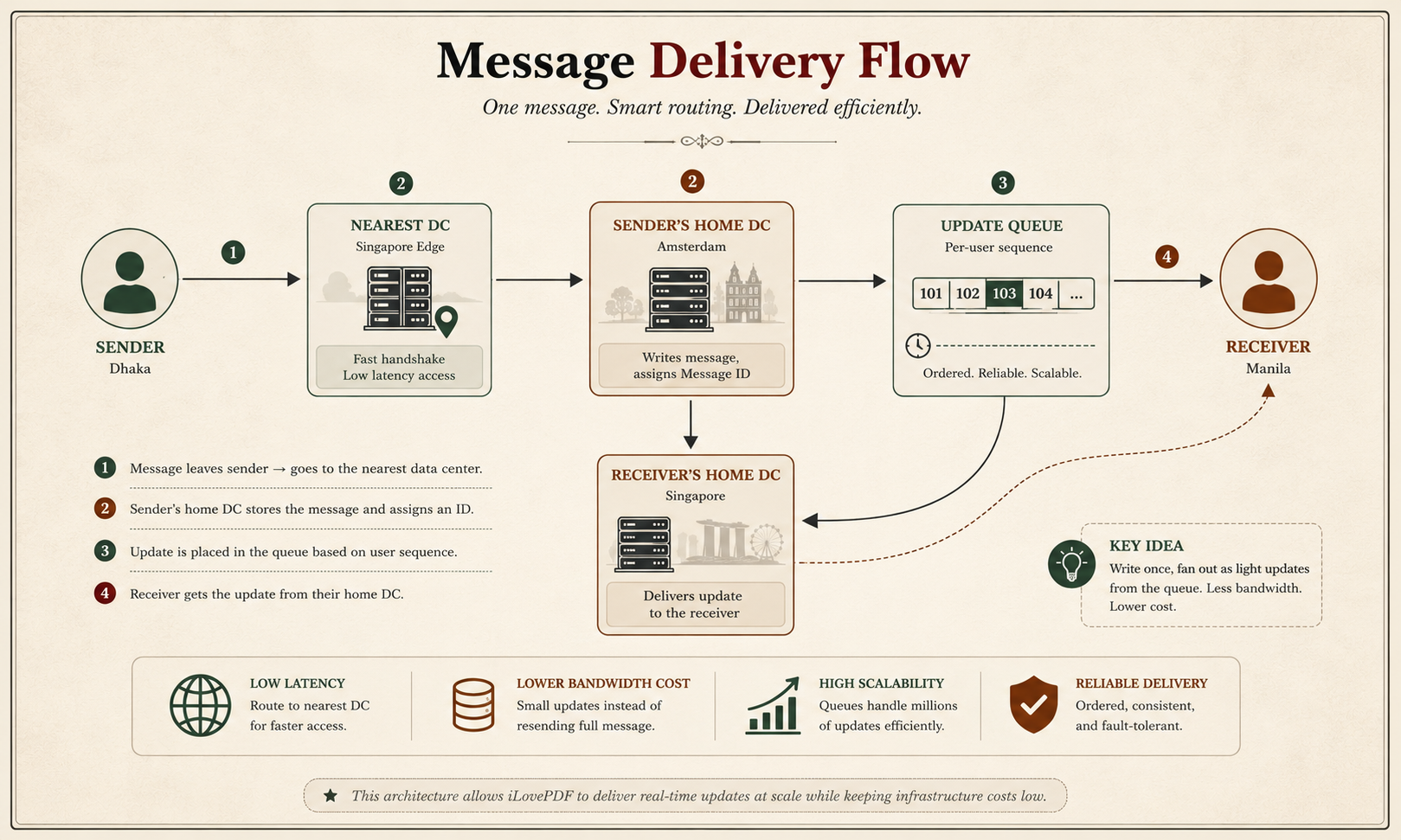
iLovePDF uses Cloudflare for content distribution and caching. All static assets (HTML, CSS, JavaScript, images) and common resources are served through Cloudflare’s global CDN, which reduces load on OVH servers and cuts bandwidth costs. By offloading public web traffic to Cloudflare’s edge, iLovePDF avoids using origin compute/GPU cycles and network egress for repeat or static requests. This also greatly improves response time worldwide without extra infrastructure investment.
We did not find evidence of sophisticated application-layer caching (e.g. caching processed PDFs), probably because each uploaded document is unique. However, iLovePDF likely caches service configurations, library code, and any API responses where possible. For example, its desktop and mobile apps might cache common UI components locally. Even database queries (e.g. for account or pricing info) could use in-memory caches like Redis to reduce database load. All these caching layers, while not publicly documented, are standard cost-saving tactics.
PDF Processing Optimizations
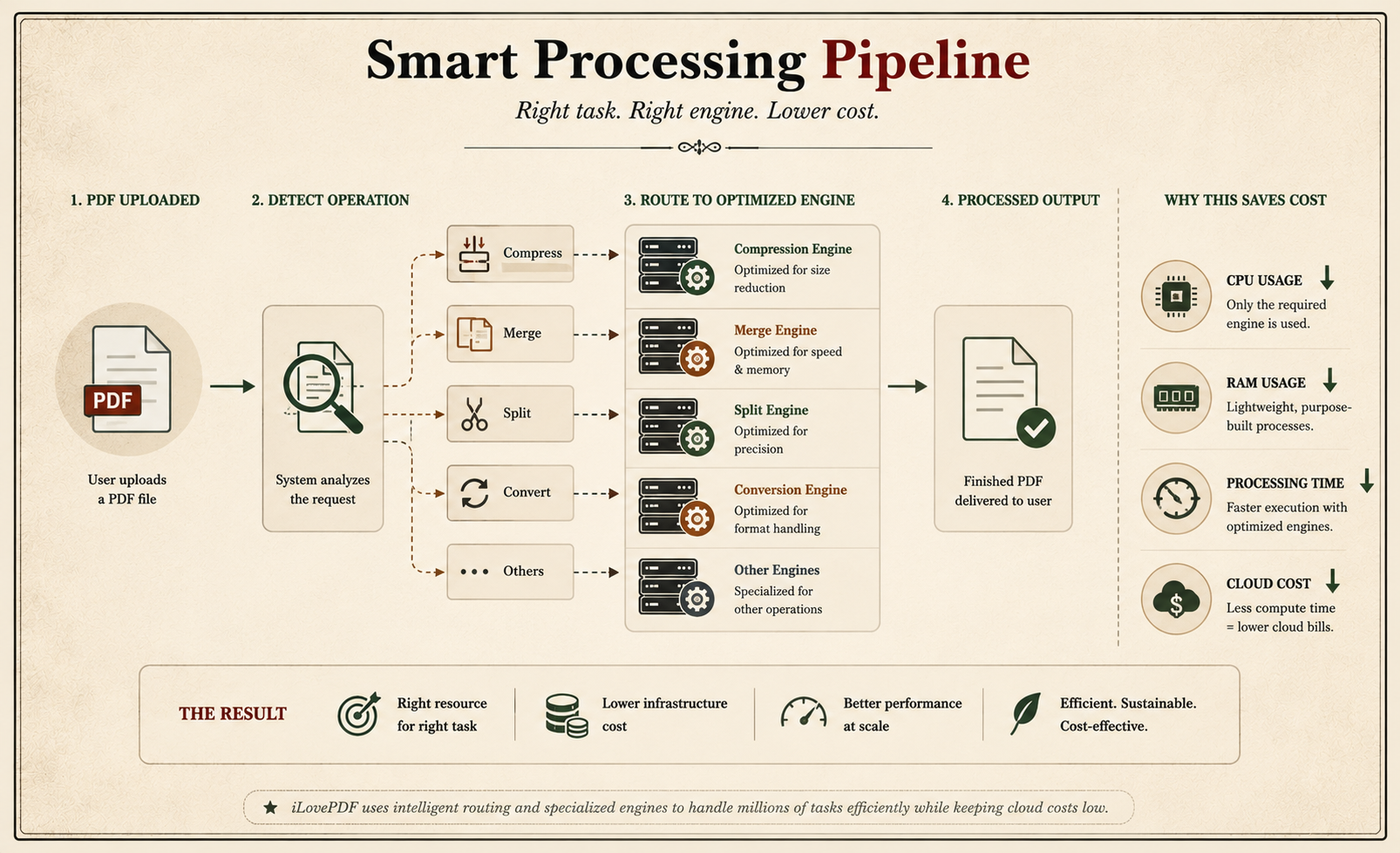
iLovePDF’s core value is fast PDF operations, and cost-wise, it aims to do each in the most efficient way. Although the company hasn’t published its internal PDF engine details, clues allow inference of common techniques:
Efficient libraries: iLovePDF’s backend (the iLoveAPI) almost certainly uses optimized native PDF libraries (likely written in C/C++). The LinkedIn tech summary notes they “likely apply PDF processing libraries” under Python/PHP layers. Open-source libraries like Ghostscript or MuPDF are typical choices. Ghostscript is “free to use” (though AGPL-licensed) and widely used for PDF tasks. Using such free tools avoids paying expensive per-seat licenses (e.g. Adobe Acrobat, which has “per-seat” costs that scale poorly). Inference: By favouring open-source engines, iLovePDF cuts software licensing expenses.
Streaming and incremental processing: Heavy PDF tasks (merging, compressing, OCR) can require large memory. To save cost, iLoveAPI likely processes files in streams. For instance, ghostscript and similar tools operate page-by-page and write output progressively, so they never need to load an entire huge file in RAM. This streaming approach keeps per-process memory low, allowing more concurrent workers on the same hardware (improving cost efficiency). We have no direct citation, but streaming is standard in PDF tools. If custom code is used (in Python or C), it would similarly buffer data in chunks.
Batching: iLovePDF offers batch processing only to paid users (the free plan is limited for batch jobs). From a cost perspective, enabling customers to upload multiple files and process them in one go can improve throughput. If a business processes 100 PDFs at once, the overhead (e.g. initializing libraries, I/O setup) is paid once per batch, not per file. This amortizes fixed costs. Internally, iLoveAPI probably accepts arrays of documents per request for business tiers, reducing repeated overhead. Conversely, free users are restricted, which prevents abuse of resources by trivial accounts.
Multi-threading and parallelism: Though not documented, iLovePDF almost certainly parallelizes work across CPU cores. For example, a multi-page PDF could be split into page ranges processed in parallel (especially for tasks like OCR). Such parallelism speeds jobs and makes better use of multi-core servers, which is a cost-saver (more work per CPU hour). If iLoveAPI is containerized, Kubernetes or a similar orchestrator could automatically scale pods across cores.
Memory/CPU tuning: Heavy PDF operations (like high-quality image compression) can be CPU-intensive. To keep cloud costs down, iLovePDF may throttle or limit CPU/memory per process. For example, Ghostscript allows adjusting CPU affinity or limiting threads. They might also restrict simultaneous conversions per machine. These tunings reduce the risk of runaway processes consuming extra compute.
Avoiding re-computation: If multiple users convert identical or overlapping documents, caching intermediate results (e.g. hashed chunks) could save processing. There’s no evidence iLovePDF does global deduplication, but it is a known technique. Even simple caching of recently processed docs for a short time might cut costs on repeat uploads (especially from mobile/desktop sync). This is speculation (no source), but consistent with large-scale PDF services.
Overall, iLovePDF’s processing engine (via iLoveAPI) likely implements many of these optimizations to maximize throughput on limited hardware. By processing each file as quickly and lightly as possible, the company reduces CPU-minutes used per document, which in turn lowers cloud usage fees. The combination of efficient libraries, streaming I/O, parallelism, and request batching all contribute to cost reduction (though the specifics are iLovePDF-internal and not publicly detailed).
Queuing and Load Management
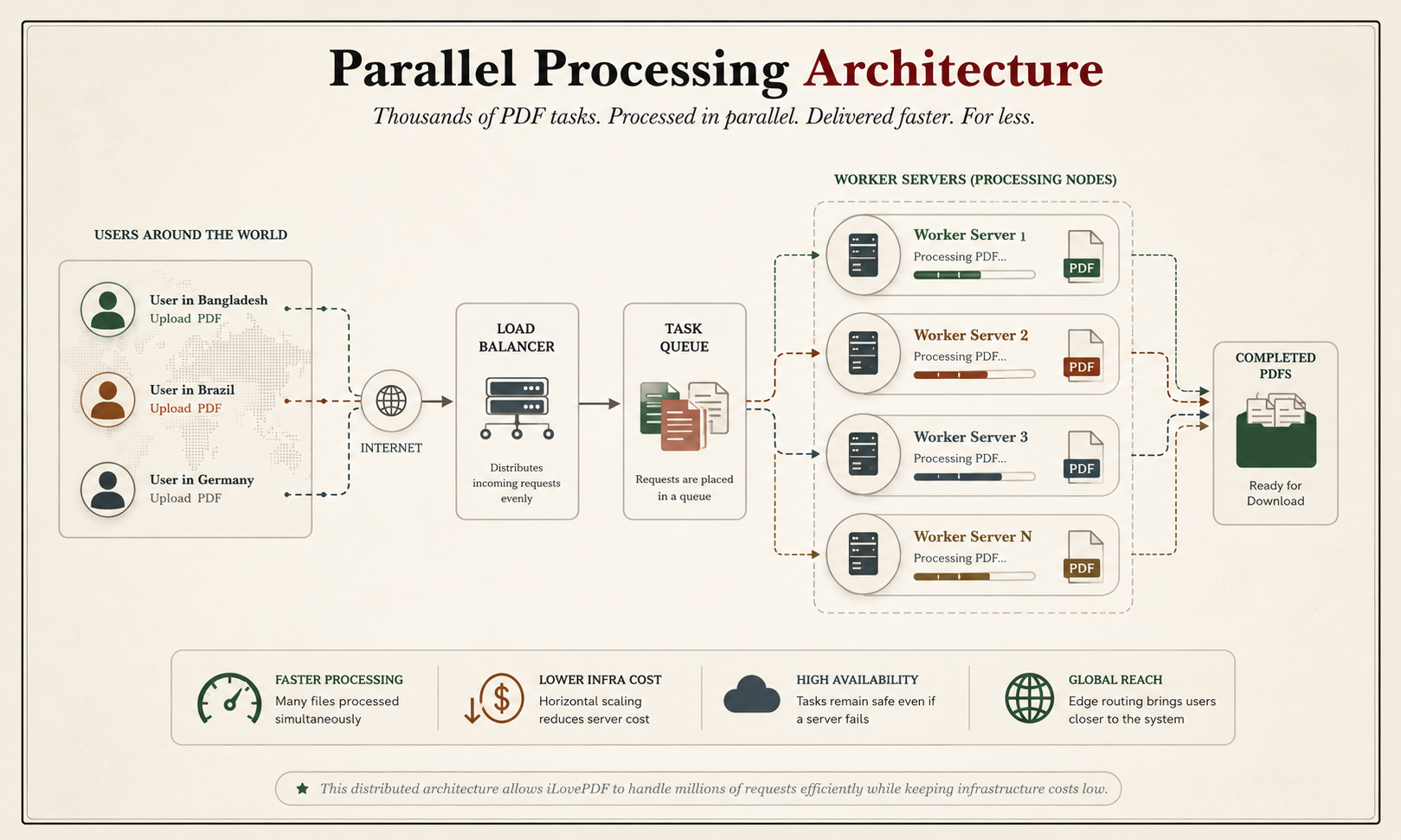
Handling spikes of user requests cheaply typically involves asynchronous queues and intelligent load balancing. iLovePDF uses OVHcloud’s Load Balancer to distribute incoming web/API traffic across its servers. Behind that, an internal job queue (e.g. RabbitMQ, Kafka, or a managed task queue) likely sits between the web/API front end and the PDF worker processes. This decoupling means web nodes can quickly enqueue jobs without tying up resources, and a pool of worker processes can pull tasks as CPU is available. In practice, when traffic surges, the queue backs up instead of crashing the system, allowing iLovePDF to scale workers gradually.
Though iLovePDF hasn’t disclosed its queuing system, using one is best practice in scalable SaaS. It also enables cost savings: workers can auto-scale based on queue length, spinning up or down through OVH’s public cloud as needed rather than running idle servers. The OVH Load Balancer and vRack enable traffic to be directed to any region’s workers, smoothing the load geographically.
In short, by queuing requests and using a pooled worker model, iLovePDF prevents over-provisioning. At low demand, only a few worker instances run; at high demand, more are brought online. This elastic load management (likely set up via OVH’s public cloud auto-scaling) cuts costs by aligning resource usage with real traffic. It also provides graceful handling of spikes (“When our website is saturated… we need to scale… immediately” – a CEO quote) but does so within an automated framework to avoid wasted spend.
Auto-Scaling and Spot Instances
To minimize idle costs, iLovePDF relies on cloud auto-scaling. The OVH Public Cloud environment hosting its microservices is “pay-as-you-go” with on-demand resources. In practice, this means they can launch additional VMs when needed and shut them down when load subsides. Although iLovePDF has not published its exact scaling policies, it likely employs CPU or queue-based triggers. This cost-aware scaling ensures they only pay for extra capacity during peak periods.
OVH (like AWS/GCP) also offers spot/preemptible instances (cheaper virtual machines that can be taken away). We found no direct mention that iLovePDF uses spot instances. However, as a PDF processing service, some jobs (e.g. large non-interactive batches) could tolerate interruptions. If implemented, using spot VMs for batch compression or conversions would cut compute costs (often by 70–90%). The trade-off is complexity: iLovePDF would need to checkpoint work and retry failed jobs when a spot is reclaimed. We infer that if iLovePDF has a resilient pipeline, spots could provide big savings; if not, this remains a possible future optimization.
Multi-Tenant Architecture
iLovePDF is a classic multi-tenant SaaS – all users share the same pool of servers. There is no indication of single-tenant deployments. Multi-tenancy maximizes utilization: resources (CPU, memory) are shared across workloads, so overall utilization is higher than if each customer had isolated hardware. The downside is “noisy neighbour” risk, but iLovePDF likely isolates tasks per user session to avoid interference. From a cost standpoint, shared infrastructure is far more efficient for a free/basic tier than dedicating machines per user. Inferences: Because business and free users intermix on the same OVH servers, the company can spread fixed costs (hardware, bandwidth) across millions of users, keeping per-user costs minimal.
(Any slight multi-tenancy can extend to data isolation or SSO features in business plans, but even Business customers apparently share compute, not whole servers. The pricing table hints that even business accounts are single-tenant only in terms of service level, not infrastructure.)
Licensing and Third-Party Tool Costs
Licensing costs for core PDF engines can be high at scale. Enterprise libraries or APIs often charge per-instance or per-seat. In contrast, iLovePDF’s scale (tens of millions of docs/day) suggests avoiding expensive licenses. For example, as one industry blog notes, Ghostscript is “free, open-source”, whereas Adobe Acrobat has “per-seat” pricing that is “prohibitively expensive” for millions of docs. We infer iLovePDF uses open-source or custom solutions wherever possible. Even if Ghostscript’s AGPL license is a concern, a commercial license from Artifex (Ghostscript’s company) would still be cheaper than other alternatives. Similarly, OCR is likely done with free engines (e.g. Tesseract) rather than paid OCR SDKs.
Among third-party services, iLovePDF appears to consolidate with OVH offerings to save costs. As noted, they use OVH SMS Pro instead of a separate SMS API, and they rely on OVH’s own load balancers and networks. They also use Cloudflare, which has a generous free tier, to front-end their site. Cloudflare’s security and SSL (they mention DigiCert for TLS) may be bundled or discounted at scale. By sticking largely to OVH/cloud-native or open tools, iLovePDF minimizes recurring license and SaaS fees.
On the paid-service side, iLovePDF monetizes consumption via credit-based pricing in its iLoveAPI product. Each API call (e.g. "Merge PDF") consumes a small number of credits; high-volume subscriptions get volume discounts. This pay-per-use model encourages efficiency: heavy users buy credits in bulk, but unused credits expire, so inefficient conversions directly cost them money. From iLovePDF’s perspective, charging per page or file processed ensures revenue tracks costs (compute time) closely, offsetting cloud spending.
Monitoring, CI/CD, and Observability
While iLovePDF has not published details on observability, we assume they employ standard monitoring to cut costs. Continuous monitoring of CPU, memory, queue length, and network usage is essential for any FinOps strategy. For example, cloud cost monitoring could reveal underutilized instances or oversized VMs. OVHcloud offers operations tools (metrics, alerts), or iLovePDF might use open-source solutions (Prometheus, Grafana) or SaaS (Datadog) on top. By instrumenting their services, they can identify waste (e.g. idle servers, memory leaks) and adjust accordingly.
In deployment, iLovePDF likely uses a CI/CD pipeline with Infrastructure-as-Code. Efficient CI/CD can reduce downtime (avoiding costly outages) and permit disposable environments. For instance, testing on short-lived environments (spin up/test/destroy) in OVH’s cloud avoids paying for permanent staging servers. Container registries and build caches would speed deployments, indirectly saving engineers time and cloud minutes. (These are industry best practices – no specific iLovePDF citation – but worth noting as inferred cost optimizations.)
Data Transfer and Egress Minimization
Data transfer costs can be significant in the cloud. iLovePDF minimizes these by: (a) using Cloudflare to cache and serve assets at the edge, (b) confining most processing to Europe, and (c) leveraging OVH’s private network for inter-server transfer. Because all OVH servers connect via a high-capacity private fiber (vRack), moving large files between data centers incurs no public egress fee. Moreover, by processing files where they are uploaded (regional processing options), the company avoids cross-region traffic. Finally, compressing files (using iLovePDF’s own compression tools) before download can reduce user egress; though users ultimately retrieve the final PDF (incurring download costs), any bandwidth saved on uploads benefits both user and host in aggregate.
Security and Compliance Trade-Offs
iLovePDF prioritizes European security standards, which influence cost. The company is ISO 27001 certified and GDPR-compliant. Achieving and maintaining these standards typically raises costs (audits, specialized staff, and encryption overhead), but it was necessary for trust and regulation. To balance this, iLovePDF chose OVHcloud because OVH has relevant certifications (ISO 27001, 9001) and EU data centers. By aligning with OVH’s secure infrastructure, iLovePDF offloads much of the compliance burden (and cost) to the provider. In effect, iLovePDF trades a slightly more expensive regional cloud for lower legal/risk costs. This ensures that security/privacy costs are managed without catastrophic overspend (e.g. avoiding fines).
Notably, iLovePDF encrypts data in transit (HTTPS/TLS via DigiCert) and at rest but avoids long-term storage of personal documents (auto-deletion after 2h) to limit breach risk. This short retention policy itself reduces potential security costs – there’s little sensitive data on disc to protect.
Business-Level Pricing and Feature Gating
Beyond technical measures, iLovePDF’s pricing model is a key cost-control mechanism. The service employs a freemium model: free users get basic tools with strict limits, while paying subscribers unlock unlimited use. For instance, the free plan only supports a small number of documents per day and caps file sizes, whereas paid plans remove those caps. Batch processing is allowed only in premium plans, preventing free users from launching expensive multi-file jobs. By tiering features this way, iLovePDF ensures that high-load activities are performed by customers who generate revenue, offsetting the cost of the additional resources they consume. In effect, usage limits on the free tier help the company control load and costs, while subscriptions scale with capacity needs.
Furthermore, the iLoveAPI credit system is inherently pay‑per‑use. A customer pays for each operation (e.g. 5 credits to merge a PDF). This aligns incentives: if a user tries to run thousands of OCR requests, they must buy more credits, directly funding the compute. The 2,500 free credits/month let new developers try the service without burdening it at scale. But beyond that, costs are passed on to the user. This model ensures predictability and that the customer, not iLovePDF, bears the marginal cost of their processing.
In marketing, iLovePDF even touts cost savings. Their site claims “82% cost savings for businesses switching to iLovePDF” (presumably vs old workflows or on-premise tools). While this is a promotional figure, it highlights the business rationale: by centralizing PDF processing in an optimized cloud service, companies save money on software and hardware they no longer need. It’s both a selling point and a reflection of iLovePDF’s own internal efficiency.
Sources: Official iLovePDF/OVHcloud content and analyses as cited above. Where iLovePDF’s exact practices aren’t published, we’ve inferred likely solutions from industry best practices and the available clues. Any claim not directly from a source is clearly noted as an inference.